


Lashify
4.8208.00 Reviews
App Specs
- Version
- 2.0.67
- Updated On
- License
- Free
- Downloads
- 10,000+
- Developer
- Lashify Inc.
- Categories
- Beauty
- Platform
- Android
Screenshots
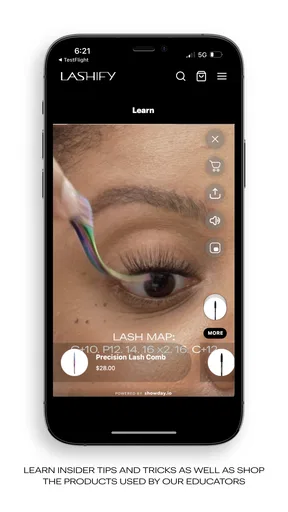
 Analysis by AppCompare
I approached Lashify as a beauty app for people who want more control over the look of lash extensions without making every appointment a salon visit. Its focus is DIY luxury lash extensions, but the useful question is not simply whether the idea sounds appealing. The real test is how practical the experience feels when I am choosing a style, learning a technique, or trying to prepare for an event from a phone.
Developed by Lashify Inc., the free app sits in the Beauty category and is aimed at a Teen audience. It has a 4.8 average from around one thousand ratings and has passed ten thousand installs, which suggests that it has found a clear audience without pretending to be a general-purpose beauty platform. I see it as a focused companion for people already curious about lash application, rather than an app that tries to cover every part of makeup and skincare.
How the app fits into a real lash routine
The most convincing way to use it is as a preparation tool. I would open it before buying lash supplies, before attempting a new look, or before getting ready for a night out. That order matters: lash work is much less stressful when the style and application steps are considered before adhesive, tweezers, and lashes are already on the table.
For a beginner, the attraction is the possibility of learning at home instead of relying entirely on a professional appointment. That does not make the process effortless. Applying lashes still requires a steady hand, patience, and a willingness to remove and retry when placement is uneven. What the app can do well is make the learning process feel more structured than guessing from a random short video.
I also found the focused subject useful. Many beauty apps bury lash information among complexion products, hair tutorials, filters, and shopping content. Here, the purpose is easier to understand: this is about building a lash look and becoming more comfortable with the application process. That narrower scope is a strength for someone who already knows what they want to improve.
The app is less compelling if you only want a quick visual effect with no interest in technique. A mascara routine is faster, easier to remove, and usually less demanding when your schedule is tight. Salon extensions are also a better fit for anyone who wants a professionally applied result and does not want to practice on themselves. I would not treat Lashify as a replacement for either option; I see it as a bridge between ordinary makeup and a more involved at-home routine.
Where connectivity changes the experience
The network matters most during discovery and preparation. Beauty content often depends on loading images, instructions, product information, or other changing material, so I would plan to explore the app while connected rather than waiting until I am already in front of the mirror. That is especially important before an event, when a slow connection can turn a calm preparation session into rushed improvisation.
Worth Reading Before You Choose

EA SPORTS FC Mobile 26 Is a Bigger Football Game, but It Takes Time

Flipboard Shows What News Apps Must Do Beyond the Feed

Switching to Android Auto Means Rethinking Your Driving Routine

Google Calendar Makes a Crowded Week Easier to Manage

Ludo King Makes the Most of the Minutes Between Plans

Baby Panda World Brings Quick Play to Modern Phones, but Its Game Library Feels Busy
I would not begin a first attempt by assuming that every useful part of the experience will be available at the exact moment I need it. A sensible workflow is to review the relevant material early, note the steps that matter, and keep the phone positioned where it can be checked without touching it repeatedly. This is not just about speed. Less handling helps keep the process cleaner and reduces the chance of losing focus while working around the eyes.
There is also a practical difference between browsing and applying. Browsing can happen anywhere, but application needs a stable surface, good lighting, a mirror, and enough time to concentrate. The app is therefore most useful before the physical routine begins. It helps me decide what I am going to do; it should not be the only thing I am relying on while my attention is split between a screen and delicate lash placement.
On a phone, this makes the experience feel naturally divided into two stages. The first stage is connected research and preparation. The second is hands-on work, where the device becomes secondary. That division is easy to overlook, but it is one of the most important ways to use a beauty app safely and efficiently.
Using it in everyday mobile situations
A realistic scenario would be getting ready for a dinner after work. I might use a short break earlier in the day to look at the app, decide whether I want a subtle or more noticeable lash effect, and refresh my memory about the application sequence. Later, at home, I could set up the mirror and tools before opening the phone again. That is much more practical than trying to learn everything five minutes before leaving.
Another good situation is a quiet weekend when I can practice without the pressure of an appointment or event. I would treat the first session as a trial rather than a final beauty result. The goal would be to understand placement, timing, and removal, then adjust the next attempt. This approach makes the app more valuable because it turns a single use into a repeatable routine.
The mobile format is convenient for comparing ideas in the room where the routine actually happens. At the same time, the small screen can become a limitation when instructions contain fine visual details. I prefer using the largest comfortable view available on the phone, increasing brightness only as needed, and avoiding glare from overhead lighting. If I cannot clearly see a step, I would pause instead of trying to interpret it while holding an applicator near my eye.
People with limited dexterity, sensitive eyes, or very little patience should think carefully before choosing a DIY lash approach. The app may make the process easier to understand, but it cannot remove the physical demands of applying extensions. Someone who regularly experiences eye irritation should be particularly cautious and should not treat an app tutorial as medical guidance.
What happens when the connection or routine goes wrong
Connectivity problems are most frustrating when they appear halfway through preparation. If content takes too long to load, my first response would be to stop and reset the session rather than repeatedly tapping. I would check the connection, close unnecessary activity, and return to the app when the phone is stable. The important point is to avoid making a beauty decision while distracted by technical trouble.
I would also build a small recovery habit: review the sequence before starting, keep the tools arranged in the order I expect to use them, and give myself enough time to stop if the result looks uneven. This reduces dependence on constantly looking at the screen. It also makes the app useful as a learning aid rather than a live control panel that must remain open every second.
When the physical application goes wrong, patience is more valuable than speed. An extension that feels misplaced should not be forced into position simply because the app is open and the routine has begun. I would remove the problem carefully according to the product guidance available to me, clean up the workspace, and try again later if my eyes or hands feel tired. The app can support preparation, but it cannot judge comfort as well as the person wearing the lashes.
Version 2.0.67 is the version associated with the current experience, and the app supports Android 8.0 and later. That makes device compatibility worth checking before planning a session, particularly if you are using an older phone. A beauty routine is a poor time to discover that the device cannot run the app comfortably or that its display makes detailed viewing difficult.
Being sensible with mobile data
Because the experience involves beauty material that may include visual content, I would use a reliable Wi-Fi connection for the initial browsing session whenever possible. That is a simple way to avoid interruptions and preserve mobile data for situations where I genuinely need the app away from home. It also lets me take more time exploring without watching the connection struggle in a busy location.
For a data-conscious routine, I would avoid leaving the app open while doing the actual application unless I need to check a specific step. I would read first, prepare the space, and use the phone in short reference moments. This has two benefits: it limits unnecessary network activity and keeps my attention on hygiene, placement, and comfort.
I would also avoid assuming that a page I viewed once will behave exactly the same way later. Beauty apps can change as content and app versions develop, so I prefer checking important instructions before a planned event rather than discovering a changed screen at the last minute. That is a small habit, but it prevents the app from becoming a source of avoidable uncertainty.
The free price makes experimenting with the app less of a commitment, especially for someone deciding whether DIY lash extensions suit them. Free does not mean the overall routine costs nothing, though: the physical lashes and related supplies are separate considerations, and the time spent practicing is part of the real investment. I would judge the app by whether it helps me use those materials more confidently, not by treating the download itself as the complete beauty solution.
How it compares with familiar alternatives
Compared with mascara, Lashify offers a more involved route toward a lash-extension look, but mascara wins on speed and simplicity. If I am heading out in ten minutes, I would choose mascara. If I want to learn a reusable at-home process and care about a more constructed lash appearance, the app becomes more relevant.
Compared with a salon appointment, the app gives the user more control over timing and practice. That can be liberating, but it also transfers responsibility to the individual. A professional brings experience, steadiness, and an outside view of symmetry. I would choose the salon when consistency matters more than flexibility, and the app when I want to develop an at-home skill gradually.
Compared with broad beauty tutorial platforms, its specialization is both its advantage and its boundary. A general platform may offer more variety across makeup and hair, while this app is easier to approach when the specific goal is lash work. I would not install it expecting a complete beauty education. I would install it because I want a dedicated place to support this particular routine.
One non-obvious trade-off is that focused guidance can make a beginner more confident while also encouraging a more ambitious result than their current technique supports. I would start with the simplest look that lets me see what I am doing. Once placement becomes repeatable, I could try more dramatic choices. Starting at the most complicated level is likely to create frustration that no app can solve.
Who will get the most from it
I think the app is best for a curious beginner, an existing Lashify user who wants a convenient reference, or anyone who enjoys doing beauty routines at home and is willing to practice. It is also useful for someone who wants to plan a look in advance instead of making decisions while applying products under time pressure.
It is a weaker choice for a person who wants instant results, dislikes screen-based instructions, or expects the app to replace professional judgment. It is also not the right tool for treating eye discomfort, diagnosing an allergic reaction, or deciding whether a particular product is medically suitable. Those situations call for appropriate professional advice, not a beauty app.
My strongest practical tip is to separate learning from execution. Explore while connected, arrange the workspace afterward, and keep the phone available only as a reference. My second is to practice on an ordinary day, not immediately before an important occasion. My third is to judge success by comfort and repeatability, not by whether the first attempt looks like a polished promotional image.
My connectivity verdict
Lashify is most useful when the phone helps me prepare rather than distracts me during application. Its free access, focused beauty purpose, and current version make it approachable for people interested in DIY luxury lash extensions, while the Teen rating reflects that it is aimed at a general older audience rather than very young children. The strong average rating and growing install base add reassurance that other users find value in the concept, but they do not remove the learning curve.
I would recommend it to a friend who is patient, wants to understand lash application, and can give the routine a calm setting with a dependable connection for preparation. I would steer a rushed friend toward mascara or a professional appointment instead. In my experience, the app works best as a thoughtful guide around the physical routine: it can help organize decisions, reduce guesswork, and make practice feel less intimidating, but the final result still depends on technique, time, comfort, and sensible judgment.
For that reason, my recommendation is positive but specific. Downloading it makes sense if DIY lash extensions are genuinely your goal. If you only need a quick everyday enhancement, the usual alternatives are more efficient. The app earns its place when learning and control matter more to you than instant convenience.
Pros
- Premium lash styles create a polished look without salon appointments.
- Customizable lengths and curl types suit different eye shapes.
- Lightweight designs can feel comfortable when applied correctly.
- Refillable lash options may reduce waste compared with disposable strips.
- Useful for special occasions
- photos
- and quick beauty transformations.
Cons
- The premium price can be high for frequent users.
- Application takes practice
- especially when placing the bond near the lash line.
- Some users may experience irritation or sensitivity to lash adhesives.
- Removal requires care to avoid pulling or weakening natural lashes.
- Results can vary with humidity
- oiliness
- and individual lash condition.
FAQs for Lashify
What is Lashify, and what can I do with the app?
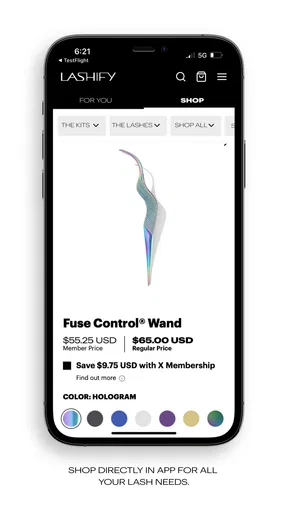
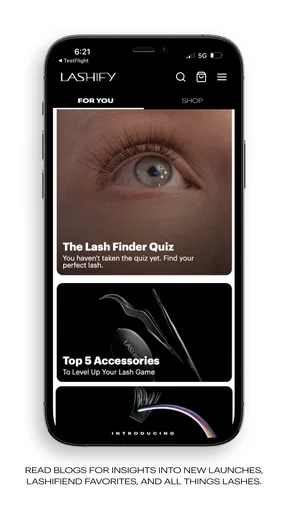
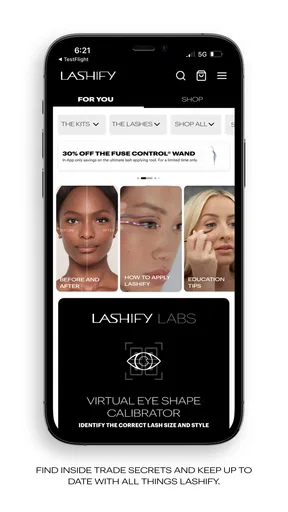
Lashify is a beauty-focused app designed to help users explore the Lashify lash system, including products, tutorials, application guidance, and styling inspiration. After installing it, you can browse lash collections, learn how the system works, review recommended tools, and find information about purchasing products. The app is especially useful for people who want salon-style lash looks at home and need visual instructions before trying them.
Is Lashify suitable for beginners, or do I need previous lash-extension experience?
Lashify is generally designed to be approachable for beginners, although applying any type of false or DIY lash system requires patience and careful technique. The app provides educational content and demonstrations that can help new users understand preparation, placement, bonding, and removal. It is still important to follow the instructions closely, avoid rushing, and practice safely, particularly if you have never applied individual or cluster lashes before.
Does Lashify require additional products or tools to use the lash system?
Downloading the Lashify app does not usually provide everything needed to apply lashes physically. Depending on the style you choose, you may need compatible lashes, bond, sealant, an applicator, and possibly remover or other accessories. The app can help explain which items work together, but users should check product descriptions and current recommendations before buying. Availability, bundles, and pricing may also vary by region.
Is Lashify safe for sensitive eyes or people who wear contact lenses?
People with sensitive eyes, allergies, irritated eyelids, or contact lenses should take extra care before using Lashify products. Cosmetic adhesives can cause irritation or allergic reactions, even when a product is marketed for home use. Read the ingredient and safety information, perform a suitable patch test when recommended, and avoid applying lashes to damaged skin. If you experience swelling, pain, redness, or vision changes, remove the product and seek medical advice.
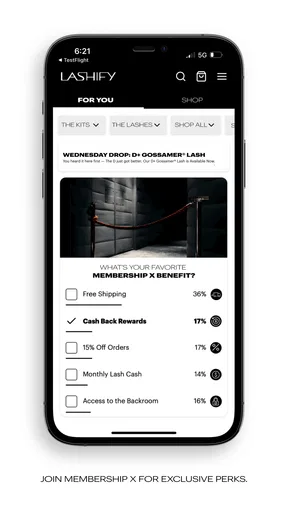
Can I buy Lashify products directly through the app, and is the app free to download?
The Lashify app may provide access to product information, tutorials, shopping features, promotions, or links to the official store, depending on your location and the current version. The app itself may be free to download, but the lashes, adhesives, tools, and accessories are separate purchases. Before ordering, review shipping costs, delivery availability, return policies, and any regional restrictions so there are no surprises at checkout.


